
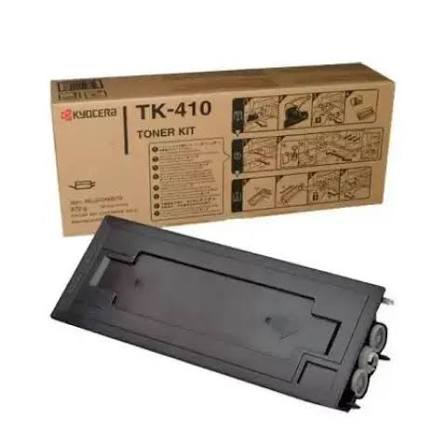
A toner code identifies a specific cartridge or toner type designed for particular printer and photocopier models. To find the right TK 410 toner, check the copier’s full model number, cartridge label and manufacturer compatibility information. Never select a cartridge based on appearance alone: similar-looking toners can have different fittings, formulations and compatibility requirements.
A toner cartridge is a consumable, but choosing the wrong one can cause more than an inconvenience. It may fail to fit, produce poor print quality, trigger an error or create problems for the machine. That is why buyers should understand the code before ordering.
For example, TK-410 and TN-321K are not interchangeable. TK-410 is a Kyocera toner reference, while TN-321K is a Konica Minolta black toner reference. The letters, numbers and suffixes matter.
Products mentioned in this article
In stock in Nairobi, with delivery across Kenya.
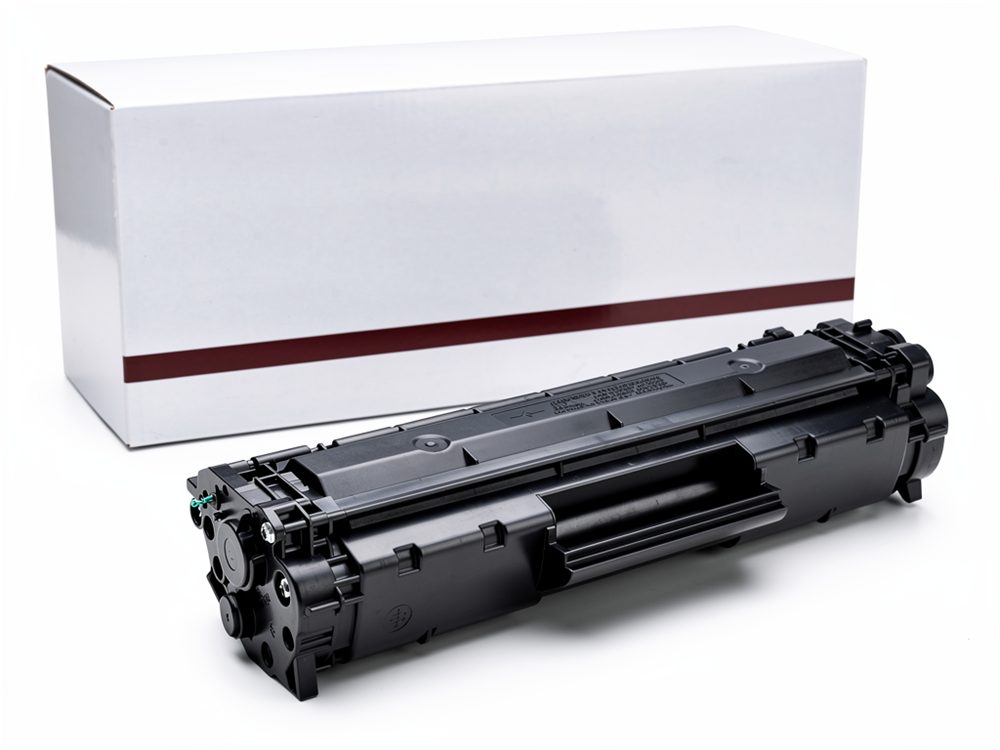

When searching for TK 410 toner, customers may encounter different ways of writing the same code, including TK-410. Search results may also show related codes such as TK-435. Similar naming does not mean that every cartridge is suitable for every machine.
The same principle applies when searching for TN321K toner. The code is commonly written as TN-321K in product documentation. The final K identifies the black cartridge in the TN-321 colour family.
A reliable toner selection process has four steps:
- Identify the exact printer or copier model.
- Read the existing cartridge label or machine documentation.
- Match the toner code against manufacturer compatibility information.
- Confirm the cartridge variant with the supplier before ordering.
These steps are especially useful when buying TK 410 toner for an older copier. Older machines can have several related consumable references, and a supplier’s general description may not show every regional variation.
If you are unsure whether your machine needs TK 410 toner, check the model plate and existing cartridge before placing an order. A clear photograph of both can help a supplier confirm the correct replacement.
Finding your code
The easiest way to identify a toner cartridge is to start with the machine rather than the cartridge name you remember. A copier’s model number provides a more reliable starting point for checking compatible supplies.
1. Check the machine model
Look for the model name printed on the front, side or rear of the copier. Some machines also show the model in their system information or settings menu.
Write down the complete model name. Do not shorten it if the manufacturer uses a suffix or series designation.
For example, a buyer looking for TK 410 toner should first confirm whether the copier is one of the supported Kyocera Mita KM models. A machine from the same brand may use a completely different toner family.
2. Read the existing cartridge
If the copier still has its old toner cartridge, remove it only according to the manufacturer’s instructions. Look for the product code printed on the label.
A cartridge marked TK-410 should not automatically be replaced with a TK-435 or another similar-looking code. Confirm compatibility for the exact machine.
Likewise, if the existing cartridge says TN-321K, do not order another Konica Minolta toner simply because it has a similar TN number. The suffix and full code are important.
3. Check the manufacturer’s documentation
Use the machine’s user guide, consumables list or official product support documentation. Look for the exact model and the compatible cartridge reference.
For TK 410 toner, Kyocera’s official product information identifies the cartridge and states a rated capacity of 15,000 pages at 6% A4 coverage. The actual number of pages obtained will depend on printing conditions and coverage.
For TN321K toner, compatibility references identify the black TN-321K cartridge for the Konica Minolta bizhub C224 family. The C224, C224e, C284 and C364 families appear in the referenced compatibility documentation. Confirm the exact regional variant with Konica Minolta or an authorised supplier before purchase.
4. Ask the supplier to confirm
If the code is unclear, provide the supplier with:
- The full copier model.
- The code on the old cartridge.
- A photograph of the cartridge label.
- A photograph of the machine’s model plate.
- The colour required, if the machine uses colour toner.
This is particularly important when ordering TK 410 toner for older equipment or when buying a compatible cartridge rather than a genuine OEM product.
5. Distinguish genuine and compatible cartridges
A genuine cartridge is manufactured and branded by the original equipment manufacturer. A compatible cartridge is made by another supplier for use in specified machines.
Both types should be checked for the exact model and code. Do not assume that every compatible cartridge has the same quality, yield or performance.
When asking about TK 410 toner, tell the supplier whether you want a genuine Kyocera cartridge or a compatible alternative. Ask the same question when ordering TN-321K supplies for a Konica Minolta copier.
TK-410 models
TK-410 is a Kyocera toner reference used in selected older Kyocera Mita photocopiers. The manufacturer’s European product page lists TK-410 as a black microfine toner cartridge with a stated yield of 15,000 pages at 6% A4 coverage.
A buyer searching for TK 410 toner should confirm the copier model before ordering. Compatibility references associate this toner family with selected KM-series models, including:
| Kyocera copier model | Toner reference to verify |
|---|---|
| KM-1620 | TK-410 |
| KM-1635 | TK-410 |
| KM-1650 | TK-410 |
| KM-2020 | TK-410 |
| KM-2035 | TK-410 |
| KM-2050 | TK-410 |
Some compatibility listings also group TK-410 and TK-435 together across related machine families. However, the two codes should not be treated as automatically interchangeable. Check the exact model and cartridge reference.
What should you check before buying TK-410?
Before purchasing TK 410 toner, confirm that the machine is one of the models specified in the relevant Kyocera documentation. Check the label on the old cartridge and compare it with the replacement.
Also confirm whether the cartridge is genuine or compatible. Ask the supplier to identify the manufacturer, cartridge code and supported models in writing.
The official Kyocera product page gives a stated yield of 15,000 pages at 6% A4 coverage. This is a manufacturer’s reference figure, not a promise that every office will achieve the same result. Page coverage, document type, settings and operating conditions affect actual yield.
TK-410 vs TK-435
TK-410 and TK-435 are separate toner references. They are sometimes displayed together in supplier listings because they serve related Kyocera machine families.
Do not assume that a TK-410 cartridge fits every machine that appears in a TK-435 listing. Confirm the exact copier model and manufacturer’s specified consumable before ordering.
If you are looking for TK 410 toner, give the supplier the model number rather than asking for a general Kyocera toner. This reduces the risk of receiving a cartridge intended for a different machine.
Signs that your copier needs a toner replacement
A copier may display a toner warning or produce lighter prints when the cartridge is running low. Other symptoms can include uneven output or faded areas.
Before replacing TK 410 toner, check the machine’s displayed message and follow its user guide. Some print-quality problems may be caused by components other than toner, so replacing the cartridge is not always the correct repair.
If a new cartridge does not resolve the issue, arrange a technical inspection rather than repeatedly buying consumables.
TN321K models
TN321K is the black toner reference in the Konica Minolta TN-321 colour cartridge family. It is associated with selected bizhub colour multifunction models, including the C224 family.
The code may appear in different formats, including TN321K and TN-321K. When searching for TN321K toner, compare the complete cartridge code and the copier model before purchasing.
Which machines use TN-321K?
Compatibility references identify TN-321K black toner for these Konica Minolta models:
| Konica Minolta model | Toner reference |
|---|---|
| bizhub C224 | TN-321K |
| bizhub C224e | TN-321K |
| bizhub C284 | TN-321K |
| bizhub C284e | TN-321K |
| bizhub C364 | TN-321K |
| bizhub C364e | TN-321K |
The compatibility list should still be checked against the machine’s regional documentation. The supplier should confirm the exact cartridge and part number before dispatch.
Understanding the TN-321 colour family
The TN-321 family includes separate cartridges for different printing colours:
- TN-321K: Black.
- TN-321C: Cyan.
- TN-321M: Magenta.
- TN-321Y: Yellow.
The K suffix identifies the black cartridge. If the machine needs cyan, magenta or yellow, ordering TN321K toner will not solve that requirement.
When ordering TN321K toner, check whether the copier is reporting that black toner is low. If a different colour is depleted, identify the correct colour-specific code instead.
Does TN321K fit the bizhub C224?
Yes. The referenced compatibility documentation lists TN-321K black toner for the Konica Minolta bizhub C224 and related models in the C224/C284/C364 family.
However, check the exact model suffix and regional part number before purchasing. Do not assume that every Konica Minolta bizhub copier uses TN-321K toner.
For buyers searching for TK 410 toner and TN321K toner at the same time, it is important to keep the brands and cartridge families separate. TK-410 is associated with Kyocera machines; TN-321K is associated with selected Konica Minolta models.
Check the cartridge part number
Compatibility documents may include a manufacturer’s part number alongside the toner code. For example, TN-321K is associated with part number A33K150 in the referenced Konica Minolta C224 suite documentation.
Use the cartridge code and part number as cross-checks. If the label on your existing cartridge differs, ask the supplier or manufacturer to confirm before ordering.
Choosing genuine or compatible toner
Once you have confirmed the correct cartridge code, decide whether you need a genuine OEM cartridge or a compatible replacement.
A genuine cartridge is supplied under the original manufacturer’s brand. A compatible cartridge is produced by another manufacturer for use in the specified copier models.
The right choice depends on the machine, supplier quality, print requirements and any warranty or service conditions.
What to ask about compatible toner
Before buying compatible TK 410 toner, ask the supplier:
- Which exact Kyocera models does it support?
- Is it a new compatible cartridge or a refilled cartridge?
- What yield does the supplier specify?
- Does it come with a product guarantee?
- What should you do if the cartridge is not recognised?
- Is technical support available?
For compatible TN321K toner, ask the same questions and confirm that the cartridge is specifically designed for the bizhub C224 family or your exact model.
Is compatible toner safe?
A compatible toner cartridge is not automatically unsafe, but quality varies between manufacturers and suppliers. A poorly made or incorrectly specified cartridge may cause leakage, print defects, recognition errors or servicing issues.
Choose a reputable supplier that can identify the cartridge manufacturer, provide a clear compatibility statement and explain its returns or warranty policy.
Do not use loose toner powder or attempt to refill a sealed cartridge unless the machine and cartridge are designed for that procedure and the work is carried out by a qualified technician.
If your copier is under a service agreement or warranty, check whether using a third-party cartridge affects the agreement.
Why toner quality matters
The toner formulation and cartridge construction affect how the machine transfers and fixes an image to paper. Poor-quality consumables can produce inconsistent output and may create avoidable maintenance issues.
For that reason, the cheapest available cartridge is not necessarily the best option. Confirm compatibility and supplier support before buying TK 410 toner or TN321K toner.
Finding the right toner cartridge
The safest way to order a replacement is to match the copier model, existing cartridge code and manufacturer documentation. This is more reliable than choosing a cartridge based on brand name or appearance.
If your machine uses TK 410 toner, confirm the exact Kyocera KM-series model and whether the cartridge is genuine or compatible. If your machine uses TN321K toner, check that it belongs to the supported Konica Minolta bizhub family and that black toner is the colour required.
Ahmed Business can help customers identify the correct consumable by checking the copier model and cartridge reference. Before ordering, confirm current availability, the cartridge type, delivery arrangements and any applicable support terms directly with the supplier.
You can browse the available toner cartridges and use the product information to identify the relevant consumable. If you cannot find your exact code, contact the supplier with a photograph of the machine label and existing cartridge.
Frequently asked questions
Which copiers use TK-410?
TK-410 is associated with selected older Kyocera Mita KM-series copiers, including the KM-1620, KM-1635, KM-1650, KM-2020, KM-2035 and KM-2050 in compatibility references. Confirm the exact model and cartridge code against Kyocera documentation before ordering.
Does TN321K fit the bizhub C224?
Yes. TN-321K black toner is listed for the Konica Minolta bizhub C224 and related C224e, C284, C284e, C364 and C364e models in the referenced compatibility documentation. Confirm the exact regional part number and machine variant before purchasing.
Is compatible toner safe?
Compatible toner can be suitable when it is correctly manufactured for the exact copier model and supplied by a reputable provider. Quality varies, so check compatibility, cartridge condition, supplier support and warranty implications. Poorly made or incorrect toner may cause print defects, leakage or recognition problems.
How do I know when TK-410 toner needs replacing?
Check the copier’s toner warning and follow the manufacturer’s replacement instructions. Faded output may indicate low toner, but it can also result from other machine or consumable problems. If replacing the cartridge does not resolve the issue, arrange a technical inspection.
Can I use TK-410 in a Konica Minolta copier?
No. TK-410 is a Kyocera toner reference, not a universal toner cartridge. Konica Minolta machines use their own specified consumable families. Check the exact model and cartridge code before ordering.
Is TN321K the same as TN-321K?
These formats are commonly used to refer to the same black toner code. The hyphen is a formatting difference, but buyers should still compare the complete code and part number against the copier’s documentation.
Questions and answers
What should you check before buying TK-410?
Before purchasing TK 410 toner , confirm that the machine is one of the models specified in the relevant Kyocera documentation. Check the label on the old cartridge and compare it with the replacement. Also confirm whether the cartridge is genuine or compatible. Ask the supplier to identify the manufacturer, cartridge code and supported models in writing. The official Kyocera product page gives a stated yield of…
Which machines use TN-321K?
Compatibility references identify TN-321K black toner for these Konica Minolta models:
Does TN321K fit the bizhub C224?
Yes. The referenced compatibility documentation lists TN-321K black toner for the Konica Minolta bizhub C224 and related models in the C224/C284/C364 family. However, check the exact model suffix and regional part number before purchasing. Do not assume that every Konica Minolta bizhub copier uses TN-321K toner. For buyers searching for TK 410 toner and TN321K toner at the same time, it is important to keep the…
Is compatible toner safe?
A compatible toner cartridge is not automatically unsafe, but quality varies between manufacturers and suppliers. A poorly made or incorrectly specified cartridge may cause leakage, print defects, recognition errors or servicing issues. Choose a reputable supplier that can identify the cartridge manufacturer, provide a clear compatibility statement and explain its returns or warranty policy. Do not use loose toner…
Which copiers use TK-410?
TK-410 is associated with selected older Kyocera Mita KM-series copiers, including the KM-1620, KM-1635, KM-1650, KM-2020, KM-2035 and KM-2050 in compatibility references. Confirm the exact model and cartridge code against Kyocera documentation before ordering.
Does TN321K fit the bizhub C224?
Yes. TN-321K black toner is listed for the Konica Minolta bizhub C224 and related C224e, C284, C284e, C364 and C364e models in the referenced compatibility documentation. Confirm the exact regional part number and machine variant before purchasing.
Is compatible toner safe?
Compatible toner can be suitable when it is correctly manufactured for the exact copier model and supplied by a reputable provider. Quality varies, so check compatibility, cartridge condition, supplier support and warranty implications. Poorly made or incorrect toner may cause print defects, leakage or recognition problems.
How do I know when TK-410 toner needs replacing?
Check the copier's toner warning and follow the manufacturer's replacement instructions. Faded output may indicate low toner, but it can also result from other machine or consumable problems. If replacing the cartridge does not resolve the issue, arrange a technical inspection.
- #copier supplies
- #Konica Minolta toner
- #Kyocera toner
- #TK 410 toner
- #TN321K toner
- #toner cartridges