
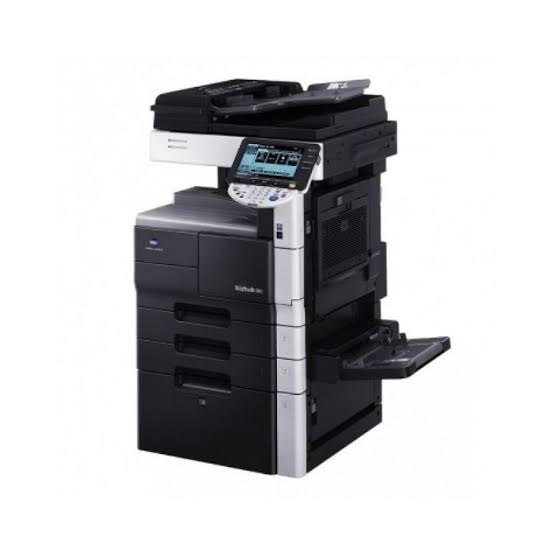
The Konica Minolta bizhub C360, bizhub C224 and bizhub C3350i are colour multifunction machines designed for different office requirements. The C360 and C224 support A3 printing, while the C3350i is an A4-class device. When comparing the Konica Minolta bizhub C360 with these alternatives, consider paper size, printing volume, machine condition, consumable availability and the features your team needs.
| Feature | bizhub C224 | bizhub C360 | bizhub C3350i |
|---|---|---|---|
| Machine class | A3 colour multifunction | A3 colour multifunction | A4 colour multifunction |
| Published rated speed | Up to 22 ppm | Up to 36 ppm | Up to 35 ppm on letter-size media |
| Paper-size capability | Up to A3/SRA3, subject to configuration | A3-class | A4-class; not A3 |
| Typical office role | Moderate-volume A3 printing | Higher-throughput A3 printing | Everyday A4 office printing |
| Toner family to verify | TN-321 | Confirm regional cartridge code | TNP-79 |
| Main buying consideration | Age and condition | Age, condition and support | A4-only capability |
Specifications and consumable codes can vary by region and machine configuration. Confirm the machine’s model plate, regional documentation and installed options before ordering supplies or purchasing.
The Konica Minolta bizhub C360 has a published rated speed of up to 36 pages per minute. The C224 specification lists up to 22 pages per minute, while the C3350i datasheet lists up to 35 pages per minute on letter-size media. These figures are not a guarantee of identical real-world performance because document complexity, colour coverage, paper size and machine condition affect output.
Products mentioned in this article
In stock in Nairobi, with delivery across Kenya.
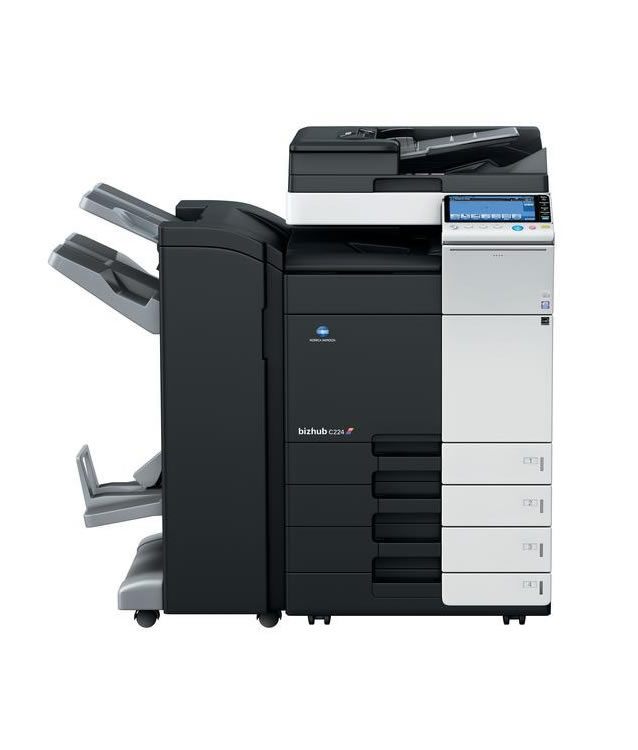


The Konica Minolta bizhub C360 is therefore worth considering when an office needs A3 printing and higher rated throughput. However, a buyer should not select a copier based on speed alone. The age of the machine, its maintenance history and the availability of replacement parts are also important.
C224 and C360: A3 colour
The bizhub C224 and the Konica Minolta bizhub C360 are A3-class colour multifunction devices. They can support offices that regularly produce larger documents such as spreadsheets, presentations, training materials, marketing layouts and reports.
bizhub C224: A3 capability for everyday office work
The bizhub C224 is a colour multifunction copier, printer and scanner. Its published specifications include A3 output and a rated speed of up to 22 pages per minute.
A business comparing the C224 with the Konica Minolta bizhub C360 should first assess its actual monthly workload. The C224 may be suitable where A3 printing is necessary but high-speed production is not a daily requirement.
Before purchasing a bizhub 224, check:
- Total page counter and colour page counter.
- Service and maintenance history.
- Condition of drums, developer units, fuser and transfer components.
- Operation of the automatic document feeder.
- Duplex printing and scanning performance.
- Included paper trays and accessories.
- Availability of toner and replacement parts.
The C224 is an older model, so its condition matters considerably. A low purchase price does not necessarily mean lower ownership costs.
Konica Minolta bizhub C360: Higher rated A3 throughput
The Konica Minolta bizhub C360 is an A3 colour multifunction machine with a published rated speed of up to 36 pages per minute. It is designed for businesses that need more throughput than a lower-speed A3 copier can provide.
For an office producing reports, proposals, colour presentations, customer documents and internal paperwork, the Konica Minolta bizhub C360 can offer a useful combination of A3 capability and higher rated speed.
The Konica Minolta bizhub C360 is an older generation of equipment, however. Buyers should inspect the individual machine rather than assume every available unit is in the same condition. Ask for the meter readings and service record, and request a demonstration before committing to a purchase.
A practical inspection should include:
- Printing a colour test page.
- Printing a black-and-white document.
- Testing duplex printing.
- Checking paper feeding from each included tray.
- Testing copying and scanning.
- Looking for streaks, uneven colour and repeated paper jams.
- Checking for error messages and unusual operating noises.
The Konica Minolta bizhub C360 may be a strong option for an office that needs A3 output, but the machine should be assessed on its actual condition and support arrangements.
C224 vs C360: Which A3 copier is better?
The C360 has the higher published rated speed, while the C224 offers a lower-speed A3 alternative. That does not automatically make the Konica Minolta bizhub C360 the better purchase for every business.
Consider the C224 if your office has moderate printing volumes, needs A3 output and can obtain a well-maintained unit at a suitable total cost.
Consider the Konica Minolta bizhub C360 if your office needs A3 printing more frequently, handles higher workloads and can verify the machine’s service history and consumable availability.
The Konica Minolta bizhub C360 should be compared with the C224 on more than its rated speed. Ask about maintenance, parts, toner, installation and any warranty offered. These details help reveal the actual cost of operating the machine.
C3350i: A4
The bizhub C3350i is a compact colour multifunction printer designed for offices that mainly produce standard-sized documents. Unlike the C224 and the Konica Minolta bizhub C360, it is an A4-class machine rather than an A3 copier.
The manufacturer’s datasheet lists print speeds of up to 35 pages per minute on letter-size media. The machine also supports office functions such as scanning, copying and duplex printing.
What the C3350i does well
The C3350i is worth considering when most office documents are standard-sized pages. Common examples include:
- Letters and business correspondence.
- Invoices and statements.
- Internal reports.
- Meeting documents.
- Forms and administrative paperwork.
- Everyday colour handouts.
A business that does not require A3 output may prefer the compact format of the C3350i. However, a company comparing the C3350i with the Konica Minolta bizhub C360 must remember that their paper-size capabilities are different.
Can the C3350i print A3?
No. The bizhub C3350i is an A4-class machine and does not provide A3 printing. If your staff regularly need A3 spreadsheets, diagrams, posters or larger layouts, consider an A3-capable copier instead.
The Konica Minolta bizhub C360 is one of the A3 alternatives in this comparison. The C224 is another option, subject to the condition and configuration of the individual machine.
Do not select the C3350i simply because its rated pages-per-minute figure looks close to the Konica Minolta bizhub C360. The C3350i is intended for A4 work, and speed figures may be based on different media standards.
C3350i vs C360: The practical difference
The C3350i is a compact A4 office device, while the Konica Minolta bizhub C360 is an A3 multifunction copier. The right choice depends on the documents your business produces.
Choose the C3350i when A4 is sufficient and you want a compact machine for everyday office printing. Choose the Konica Minolta bizhub C360 when your team needs A3 output and a machine designed for larger-format multifunction work.
If your office rarely prints A3, a larger copier may add unnecessary space and maintenance requirements. If A3 printing is part of normal operations, however, an A4-only printer will not replace that capability.
Which fits your office?
The best machine depends on the volume and type of documents your office produces. Start by identifying the paper sizes you need, then compare the workload, condition and operating costs of the machines available.
Choose the bizhub C224 if you need:
- A3 colour printing and copying.
- A multifunction machine for general office use.
- A lower rated speed than the C360.
- A well-maintained unit with verified consumable availability.
Choose the Konica Minolta bizhub C360 if you need:
- A3 colour printing and copying.
- Higher rated output speed than the C224.
- A machine for a busier office environment.
- A specific unit with a satisfactory service record.
- Confirmed access to toner, replacement parts and technical support.
The Konica Minolta bizhub C360 is particularly worth assessing when A3 documents are a regular part of office operations. However, the final decision should depend on the condition and operating costs of the actual machine offered.
Choose the bizhub C3350i if you need:
- A compact A4 colour multifunction printer.
- Everyday office printing, copying and scanning.
- No requirement for A3 output.
- A newer-generation alternative to the older A3 models.
Compare total cost, not only purchase price
The purchase price is only one part of a photocopier investment. A used machine may cost less initially but require replacement parts or servicing. A newer machine may have a higher purchase price but a different support and consumables situation.
When comparing the Konica Minolta bizhub C360 with the C224 and C3350i, request a quotation that clarifies:
- Whether the machine is new, refurbished or used.
- What accessories and paper trays are included.
- Whether installation and setup are included.
- Whether delivery is included in the quoted price.
- Which toner cartridges and consumables are compatible.
- Whether servicing or a warranty is offered.
- Whether replacement parts can be sourced locally.
For the Konica Minolta bizhub C360, confirm the exact toner code against the machine’s regional documentation. Do not rely on a generic online listing because cartridge references can differ between markets and product variants.
For the C224, the referenced manufacturer documentation identifies the TN-321 toner family. Confirm the exact cartridge variant and colour before purchasing. For the C3350i, manufacturer documentation identifies the TNP-79 toner family.
Get advice before choosing
Ahmed Business can help assess which machine is suitable for your office’s paper sizes, expected monthly volume and operating requirements.
If you are considering the Konica Minolta bizhub C360, prepare an estimate of your monthly black-and-white and colour printing. Confirm whether you need A3, and identify any finishing features such as stapling or booklet production. This makes it easier to assess whether the machine is suitable for your workplace.
You can also compare the Konica Minolta bizhub C360 with other models in the Konica Minolta product range. Contact Ahmed Business to confirm current availability, machine condition, toner compatibility and quotation details.
Frequently asked questions
Is the bizhub C224 still a good buy?
The bizhub C224 can still be a useful A3 colour multifunction machine if the specific unit is in good condition and parts, toner and technical support are available. Since it is an older model, check its page counters, service history, drums, developer units and fuser before buying. Compare the expected maintenance cost with the purchase price.
Can the bizhub C3350i print A3?
No. The bizhub C3350i is an A4-class colour multifunction printer. It is intended for standard office documents rather than A3 printing. If your business needs A3 output, consider an A3-capable model such as the C224 or the Konica Minolta bizhub C360.
Which toner fits the bizhub C224?
The bizhub C224 uses the TN-321 toner family in the referenced Konica Minolta product documentation. The family includes separate black, cyan, magenta and yellow cartridges. Confirm the exact cartridge code for your machine and market before ordering.
Is the Konica Minolta bizhub C360 faster than the C224?
The published rated speed for the Konica Minolta bizhub C360 is up to 36 pages per minute, compared with up to 22 pages per minute for the C224. Actual output depends on document type, settings, paper size, machine condition and other operating factors.
Should I buy the Konica Minolta bizhub C360 or C3350i?
Choose based on paper size first. The Konica Minolta bizhub C360 supports A3-class work, while the C3350i is designed for A4-class printing. If your office needs A3 documents, the C3350i is not a substitute. If A4 is sufficient, the C3350i may be a more suitable compact office option.
Questions and answers
C224 vs C360: Which A3 copier is better?
The C360 has the higher published rated speed, while the C224 offers a lower-speed A3 alternative. That does not automatically make the Konica Minolta bizhub C360 the better purchase for every business. Consider the C224 if your office has moderate printing volumes, needs A3 output and can obtain a well-maintained unit at a suitable total cost. Consider the Konica Minolta bizhub C360 if your office needs A3…
Can the C3350i print A3?
No. The bizhub C3350i is an A4-class machine and does not provide A3 printing. If your staff regularly need A3 spreadsheets, diagrams, posters or larger layouts, consider an A3-capable copier instead. The Konica Minolta bizhub C360 is one of the A3 alternatives in this comparison. The C224 is another option, subject to the condition and configuration of the individual machine. Do not select the C3350i simply…
Which fits your office?
The best machine depends on the volume and type of documents your office produces. Start by identifying the paper sizes you need, then compare the workload, condition and operating costs of the machines available.
Is the bizhub C224 still a good buy?
The bizhub C224 can still be a useful A3 colour multifunction machine if the specific unit is in good condition and parts, toner and technical support are available. Since it is an older model, check its page counters, service history, drums, developer units and fuser before buying. Compare the expected maintenance cost with the purchase price.
Can the bizhub C3350i print A3?
No. The bizhub C3350i is an A4-class colour multifunction printer. It is intended for standard office documents rather than A3 printing. If your business needs A3 output, consider an A3-capable model such as the C224 or the Konica Minolta bizhub C360.
Which toner fits the bizhub C224?
The bizhub C224 uses the TN-321 toner family in the referenced Konica Minolta product documentation. The family includes separate black, cyan, magenta and yellow cartridges. Confirm the exact cartridge code for your machine and market before ordering.
Is the Konica Minolta bizhub C360 faster than the C224?
The published rated speed for the Konica Minolta bizhub C360 is up to 36 pages per minute, compared with up to 22 pages per minute for the C224. Actual output depends on document type, settings, paper size, machine condition and other operating factors.
Should I buy the Konica Minolta bizhub C360 or C3350i?
Choose based on paper size first. The Konica Minolta bizhub C360 supports A3-class work, while the C3350i is designed for A4-class printing. If your office needs A3 documents, the C3350i is not a substitute. If A4 is sufficient, the C3350i may be a more suitable compact office option.
- #A3 printing
- #bizhub C224
- #bizhub C3350i
- #bizhub C360
- #Konica Minolta
- #office printers
- #photocopiers